Private home intelligence

Capture, design and understand your home.

Turn your rooms into a living plan. Scan or import, design in 2D and 3D, preview in AR, then learn through Vastu, Feng Shui, energy and accessibility lenses — all in one private app.

  • Private & on-device
  • Works offline
  • 8 languages
  • Phone, tablet & desktop
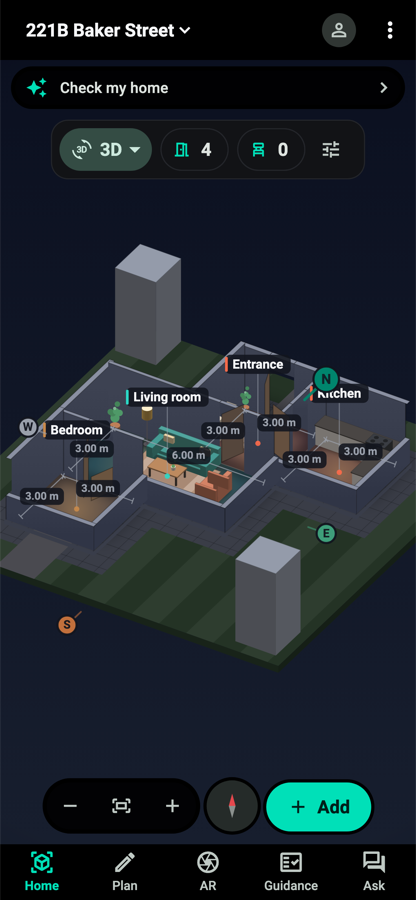
VastuAI 3D dollhouse view
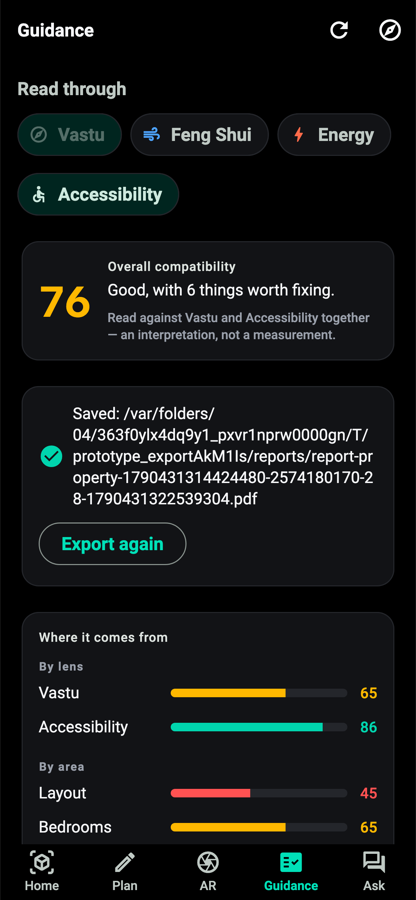
VastuAI report export screen
From plan to insight.Your model powers design, AR, guidance and exports.

Why VastuAI

One app for the whole journey.

Most apps stop at a floor plan, a furniture mockup or a compass. VastuAI connects each step so your plan becomes useful knowledge.

CaptureScan, trace, draw or import.
PlanEdit rooms and arrange furniture.
3D / ARSee rooms from above or at true scale.
GuidanceRead Vastu and practical lenses.
AskGet plain-language answers.

Feature tour

Everything starts with your actual home.

VastuAI keeps capture, design, guidance and sharing connected to the same home model.

Capture

Start from a scan, a sketch or an existing plan.

Create a useful floor plan without pretending every input is perfect.

  • Scan supported rooms with LiDAR, or trace corners with the camera on other phones.
  • Import photos, PDFs, DXF or SVG plans and review the result before saving.
  • Use templates or draw by hand when you want full control.
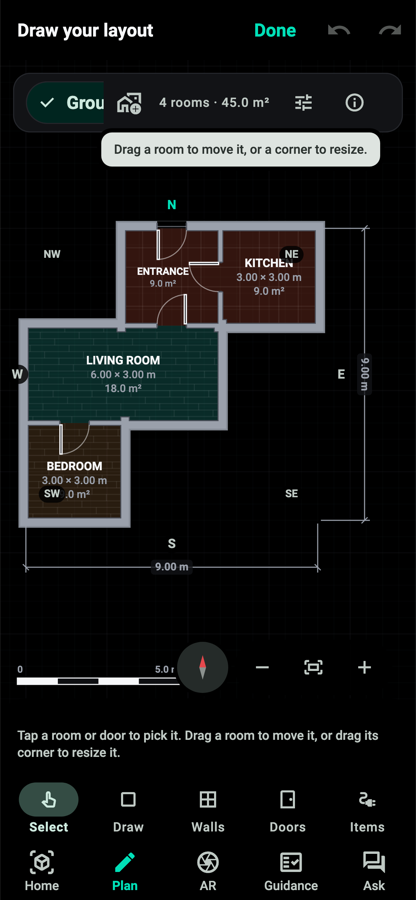
Editing a floor plan in VastuAI
Design

Plan the layout before you move a thing.

Move from clean 2D editing to furnished 3D views that make the home easier to understand.

  • Edit rooms, doors, walls, floors and templates in a precise 2D plan.
  • Drag true-scale furniture from a catalogue built for real homes.
  • Explore a 3D dollhouse, walkthrough, daylight and sun-path views.
3D home view in VastuAI
AR

Bring ideas into the room.

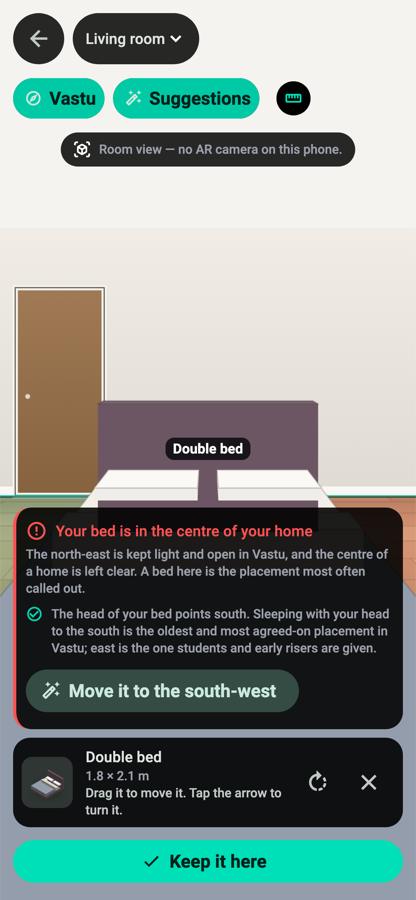
Use your phone to preview scale, orientation and zones where supported, with useful fallbacks when AR is unavailable.

  • Place furniture at true scale before buying or rearranging.
  • Walk Vastu direction zones over the room you are standing in.
  • New: point your phone at a sofa or bed and get live placement suggestions.
Trying furniture in AR
Guidance

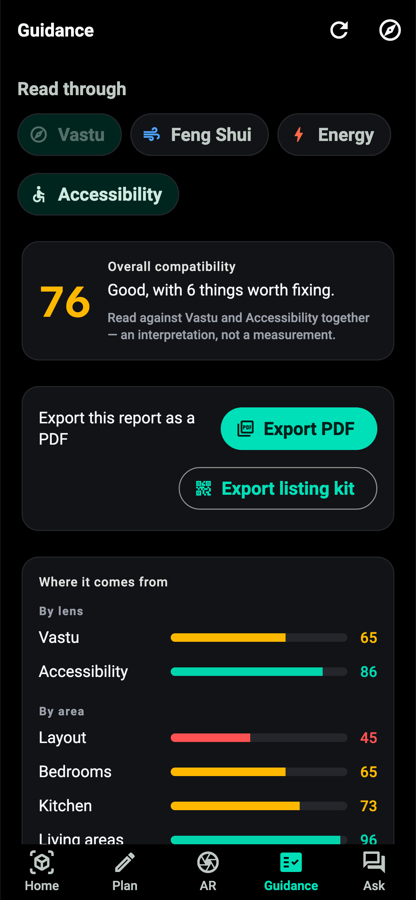
Read your home through four lenses.

VastuAI explains what it sees, why it matters and where the caveats are.

  • Use Vastu, Feng Shui, energy & daylight, and accessibility checks.
  • See scores as interpretations of your plan, not measurements of truth.
  • Review remedies and export a clear PDF report.
Guidance lenses in VastuAI
Ask

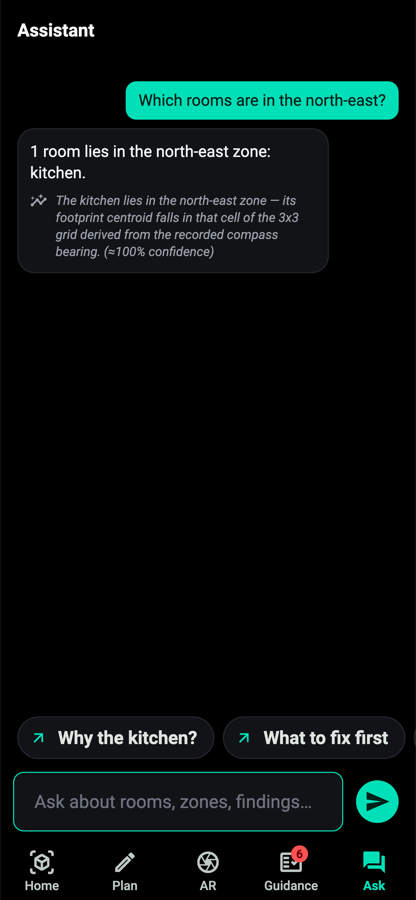
Ask questions about your own home.

Instead of generic tips, the assistant answers from the rooms, directions and findings in your plan.

  • Ask where a bed should face, what to change first or why a score changed.
  • Keep answers grounded in captured dimensions and lens findings.
  • Designed for private, on-device use without a required account.
VastuAI assistant
Share & export

Take the plan wherever it needs to go.

Share readable plans, reports and 3D files with family, consultants, contractors or buyers.

  • Export PDF reports and to-scale plan sheets.
  • Share DXF, SVG, image, USDZ and whole-home bundles.
  • Create a listing kit for property marketing.
Export options in VastuAI

Free Vastu guide

What Vastu says about every room.

Look up any room and direction before you buy, rent or rearrange. Each answer shows the classical Vastu and MahaVastu rules VastuAI applies, with their sources.

Browse all 14 rooms

Comparison

What you get versus typical apps.

VastuAI is not just a scanner, decorator or compass. It joins those jobs around your actual home plan.

Capability VastuAI Capture + plan apps Design apps Inventory apps Vastu compass apps
Scan or import a plan Yes Yes Some No No
2D + 3D home view Yes Often 2D Yes No No
AR furniture Yes Some Yes No No
Guidance on your actual plan Yes No Design only No Compass only
On-device assistant Yes No Sometimes cloud No No
Offline and private by design Yes Varies Varies Varies Varies
Indian languages Yes Varies Varies Rare Some

Built for everyone

From a new flat to a professional listing.

Homeowners & renters

Understand rooms, furniture and directions before rearranging.

Home buyers

Review a property layout before committing to changes or purchases.

Families

Create a shared picture of how the home works today.

Designers & architects

Use clear plans and exports for conversations with clients.

Realtors

Create listing-friendly plan and visual assets.

Languages

Made for multilingual homes.

Choose English, हिन्दी, தமிழ், తెలుగు, मराठी, ಕನ್ನಡ, ગુજરાતી or বাংলা — or follow your device language.

Englishहिन्दीதமிழ்తెలుగుमराठीಕನ್ನಡગુજરાતીবাংলা

Pricing

Simple plans for launch.

Final prices and store links are coming soon. No invented numbers, no surprise claims.

Free

Coming soonFor one home
  • Capture and plan
  • 3D view
  • Vastu guidance
Notify me

Pro for professionals

Coming soonFor client work
  • Listing kit
  • DXF and branding
  • Multi-client workspace

Vastu consultant? Join as a founding consultant

Contact us

FAQ

Good questions before you start.

How accurate is VastuAI?

Use it as sketch-grade planning, not a legal survey. Scans, imports and compass readings depend on your device, the source plan and your review.

Is my data private?

Yes. The product is designed to keep home data on your device, with no ads, tracking or required account.

Does it work offline?

Yes. Core capture, design, guidance and export workflows are designed for offline use.

Which phones support scanning?

LiDAR iPhones and iPads can scan supported rooms. Other phones can use camera tracing, drawing, templates and import workflows.

Which languages are supported?

English plus Hindi, Tamil, Telugu, Marathi, Kannada, Gujarati and Bengali.

Is Vastu scientific?

VastuAI treats Vastu as an interpretive design tradition, not a scientific measurement. It separates measured geometry from interpretive guidance.

How much will it cost?

Prices are coming soon. The planned tiers are Free, Pro and Pro for professionals. Everyone who joins during early access gets every feature free and is marked as a founding member, and nothing you have made will ever be locked.

What can I export?

PDF reports, plan PDFs, DXF, SVG, high-resolution images, USDZ/GLB 3D files, .vastu bundles and listing-kit assets.

Does it work on tablets and desktop?

Yes. VastuAI is designed for phones, tablets and larger desktop-style layouts.

Launch updates

Be first to try VastuAI.

Tell us when you are moving, buying or renovating, and we will write when VastuAI can help with that home. One email at launch, one near your date, nothing else.

We use your email only for VastuAI launch updates. See the privacy policy.

Coming soonApp StoreComing soonGoogle Play

Contact: [SUPPORT EMAIL]